
The Wi-Fi in a holiday rental sits in an odd spot. It is not a public hotspot in a shopping centre food court, and it is not your own network at home. It is a residential router installed by someone you have never met, in a place other people have been staying all year. On the Gold Coast alone, that description covers roughly 7,000 short-stay properties.
Three questions come up the moment you see the password stuck to the fridge: what can the host see, how much of it is worth caring about, and does four nights justify paying for anything.
The money question has the shortest answer. Four nights is not a reason to start a subscription, and a free VPN already covers the one gap a rental creates — the stretch of connection between your device and the internet. The first two questions are where the useful detail sits, and where most of what circulates online is either overstated or flatly wrong.
It’s Not Public Wi-Fi, and It’s Not Your Home Network
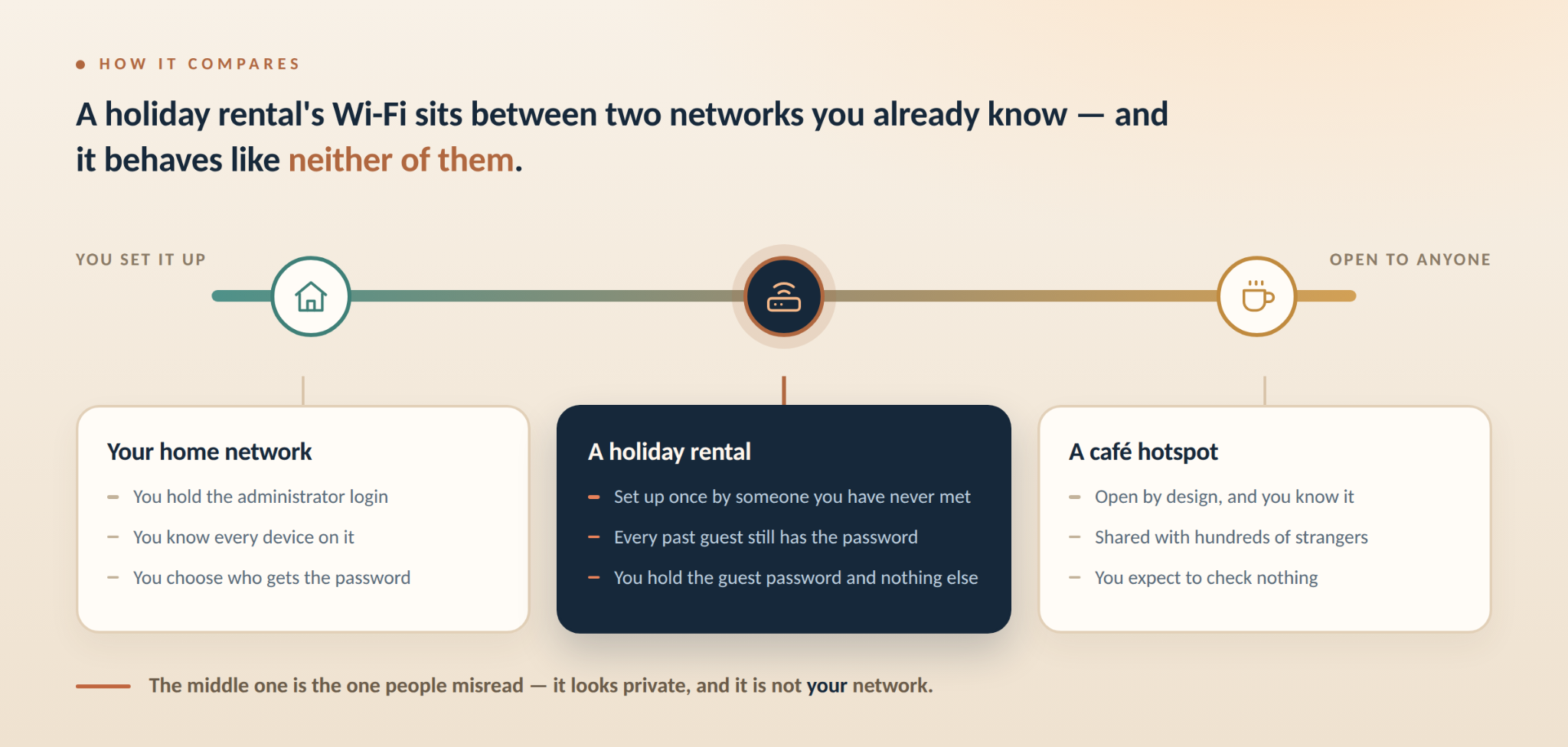
Treating a rental’s Wi-Fi like a food-court hotspot points your worry in the wrong direction.
| Who Set It Up | What You Can Check | |
| Your home network | You did | The password, the settings, every device on it |
| A café or airport hotspot | A business, for hundreds of strangers | Nothing, and it is open by design |
| A holiday rental | The owner or a manager, once, possibly years ago | Nothing — and it is not open, which is the part people misread |
Four things follow from that middle column.
The router was installed once and rarely touched afterwards, so its firmware is often whatever shipped in the box. The password is usually printed on a fridge magnet or in the welcome folder, so every guest who has ever stayed there still has it. In an apartment building, one connection is sometimes split across several units. And whoever manages the property holds the administrator login; you hold the guest password and nothing else.
Those four points are the entire difference between a rental and the two networks either side of it.
What Your Host Can Actually See — and What They Can’t
Both of the popular answers to this are wrong. One says a host sees nothing. The other says a host sees everything.
| What Whoever Manages the Router Can See | What They Can’t See |
| That a device joined, and when | The contents of a message, email or search |
| Which sites the device connected to, by domain name | Which page on that site you opened |
| How long each connection lasted | Your passwords |
| How much data moved | What you typed into a form |
Most sites now run on HTTPS, so the contents of a page, a message or a search cannot be read while they travel. The router still has to know where to send each request, which is why the domain survives. That line — where the request went, not what it carried — is the whole answer.
The left-hand column also takes deliberate effort to produce. Home routers do not keep a browsing log unless someone switches logging on or adds hardware built to record traffic. Guests have found that kind of device in rentals before. It is an exception worth knowing about, not the default setting on the box.
Where the “They Can See Everything” Claims Come From
The line about your host watching everything you do comes from social media advertising, not from how networks work.
Those clips take domain-level visibility, describe it as content-level visibility, and finish on a download button. The mirror-image error is just as common: content farms publish that a host cannot see your browsing history, which skips DNS lookups and connection records. The accurate version sits between the two, and it is specific enough to act on.
Five Minutes When You Check In
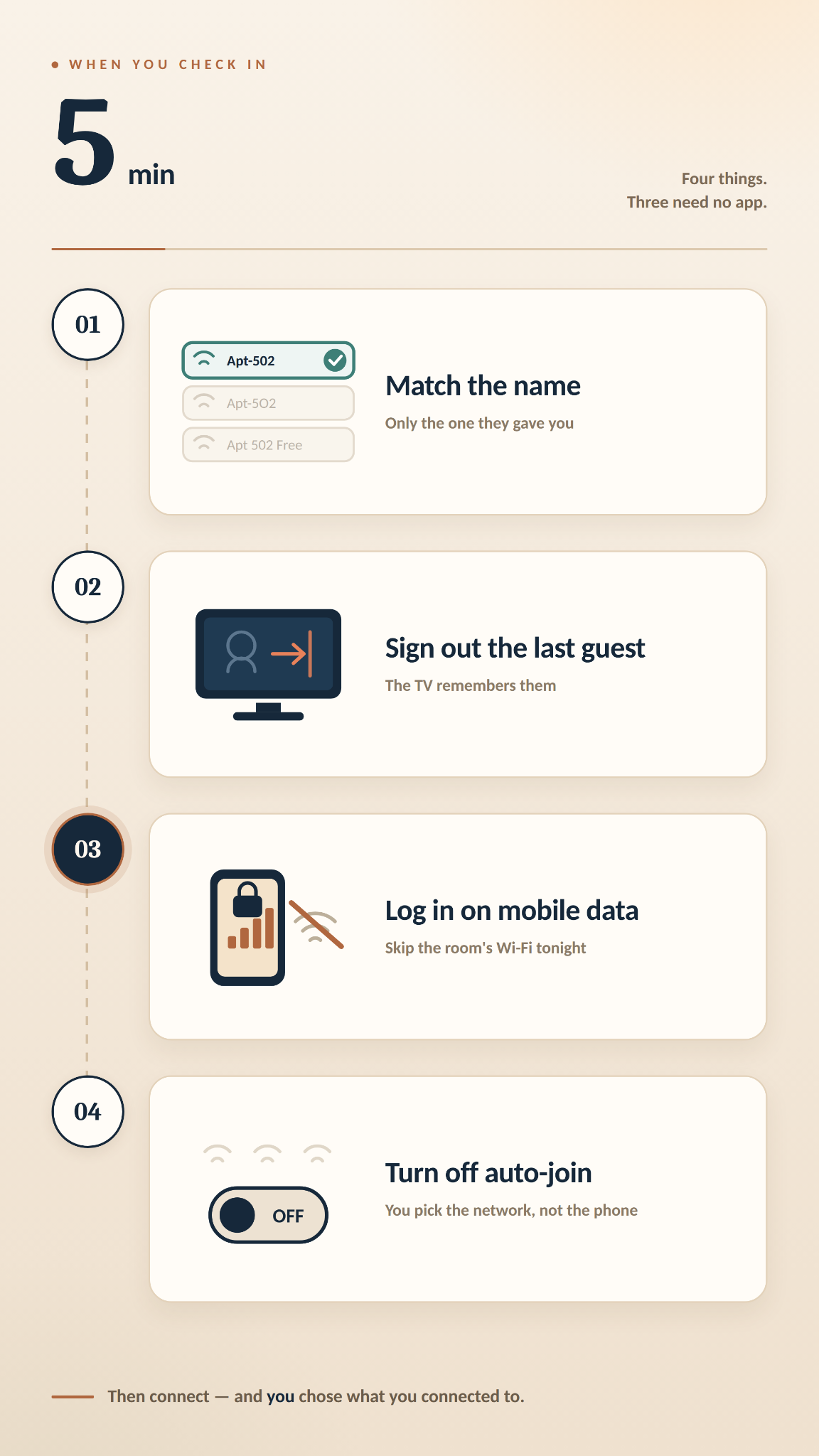
Alt: Five Steps When You Check In
Four things are worth five minutes when you arrive, and three of them involve no software.
- Check the network name against what the host gave you. A holiday apartment tower will show a dozen similar names, and the one printed in the welcome folder is the only one you have any reason to trust.
- Sign the previous guest out of the apps on the TV, or cast from your phone instead. Smart TVs are the device most often handed over still logged in.
- Use your own mobile data for important sign-ins on the first night. This is the cheapest step on the list and takes no setup.
- Turn off automatic connection to open networks on your phone. It makes every connection a choice you made rather than one your handset made for you.
The eSafety Commissioner’s Be Connected course reaches the same starting point on Wi-Fi you do not own: narrow what you do on it, and check for the padlock before you sign in anywhere. Its first instruction is about your habits, not about installing something.
If You’re Staying in a Holiday House Rather Than an Apartment
A standalone holiday house is usually simpler, because there is one router and no building network sitting behind it.
With no shared segment, what is left is the age of the router itself. Houses with patchy coverage often run extenders, which makes it harder to tell which piece of hardware you actually joined — so the name check matters more here, not less.
What a VPN Changes Here — and What It Doesn’t
A VPN works on the left-hand column of that table. The right-hand column was never its job.
It builds an encrypted tunnel between your device and a VPN server, so the router sees one encrypted connection instead of a list of domains. DNS is the other loose thread on a router whose settings you cannot inspect: built-in DNS leak protection keeps those lookups inside the tunnel rather than handing them to whatever server the router points at.
Pick an Australian location while you are holidaying in Australia. Your accounts expect you to be here, and connecting through an unrelated country is what starts your own apps asking who you are. Sydney or Melbourne keeps the connection looking ordinary and keeps latency low.
X-VPN is one service you can measure against that. It runs a no-logs policy that was independently audited in 2026, uses AES-256-GCM, and keeps its servers in memory only, so nothing is written to disk. Its free VPN for Australia tier asks for no sign-up and sets no data cap, which is the part that suits a four-night stay. On iPhone and Android the free version lets you pick a location by hand, and Sydney and Melbourne are both on the list; the free desktop version connects automatically instead.
A VPN encrypts the connection between your device and the internet. It does not sign you out of the smart TV, it does not stop the router recording that a device is online and how much data moved, and it shifts that domain-level view from the rental’s router to the company running the VPN. That last point is the reason an audited no-logs policy is the thing to check before you install anything.
If You’re the One Renting the Place Out
The answer on the host side is not a VPN. It is a separate guest network.
Most current home routers can run one, and it keeps guests apart from your own devices, cameras and storage. Airbnb’s Australian guidance, written with the Centre for Internet Safety, puts the related point plainly: “Don’t place the wi-fi password on your public Airbnb listing.” A password printed in the welcome folder has the same weakness stretched over years — every guest who has stayed keeps a copy. A guest network password can be changed between bookings.
The same guidance asks hosts to switch off remote access to the router, change the default administrator password, and keep firmware current. For a property with back-to-back bookings it suggests a new password every month.
None of this costs anything beyond ten minutes in the router settings, and it answers the guest-side question before a guest thinks to ask it.
FAQs
Can My Airbnb Host See My Search History?
No. What you searched for stays inside an encrypted connection. The router can record which sites your device reached, by domain, when someone has switched that logging on.
Is Airbnb Wi-Fi Safer Than Hotel Wi-Fi?
Usually, because far fewer people share it. The trade-off is maintenance — a hotel has staff for the network, and a rental has whoever set it up once.
Should I Just Use My Own Mobile Data Instead?
For short, important tasks on the first night, yes. For a full holiday of streaming and video calls, most plans will not carry it.
Do I Need a VPN in an Airbnb?
It depends what you do on the connection. Maps, music and streaming, no. Signing into accounts, or working on files for your employer, yes.
The Smart TV Is Still Signed Into Someone Else’s Account. What Now?
Sign it out in the TV’s own settings. Sign your own account out again before you check out.
Conclusion
A holiday rental’s Wi-Fi is not a public hotspot. It is a home router that nobody has looked at since it was installed, carrying a password that has been handed out for years. What the person managing it can see is the list of domains your device reached, not what you did once you got there. The four things worth doing when you arrive take five minutes, and three of them cost nothing.